 ultimate-guide
Why OEM Radio Software Is Difficult: A 2026 Guide
Table of Contents
- Why OEM Radio Software Remains a Top Dependability Issue
- The CAN Bus and System Integration Complexity
- VIN Locking, Proprietary Interfaces, and Hardware Constraints
- Troubleshooting OEM Infotainment Systems: Why Updates Fail
- Radio Programming Software: Why Aftermarket Tools Exist
- Aftermarket Radio vs OEM: Why Replacement Isn't Simple
- Cybersecurity and Over-the-Air Update Risks
- Conclusion: Navigating OEM Radio Software Challenges
- Frequently Asked Questions
Last Updated: September 25, 2026
Why OEM Radio Software Remains a Top Dependability Issue
According to JD Power 2026 U.S. Vehicle Dependability Study, infotainment systems remain a primary source of persistent problems for vehicle owners, contributing to ongoing difficulties with OEM radio software reliability. At RT Systems, Inc., we've tracked this frustration for over two decades as radio enthusiasts struggle with the complexity of factory-installed systems. With 20+ years of experience, we understand these challenges.
The core problem is that modern vehicle architectures demand integration with dozens of other systems, climate control, safety features, steering wheel inputs, driver assist displays, all communicating through a single network. When one system fails or updates incorrectly, the entire chain breaks.
Factory radios are deeply embedded in vehicle infrastructure, yet they're often the least reliable component. Older OEM systems face mounting compatibility challenges as software updates accumulate.
The CAN Bus and System Integration Complexity
The Controller Area Network (CAN bus) is the central nervous system of modern vehicles. Every connected component, from the radio to the engine control module, communicates through this shared protocol. OEM radio software doesn't exist in isolation; it must negotiate with steering wheel controls, climate settings, backup camera feeds, and safety diagnostics simultaneously.
This integration creates cascading complexity. A firmware update must account for every possible vehicle configuration and aftermarket addition, with a single miscalculation potentially disabling steering wheel controls or preventing the vehicle from starting.
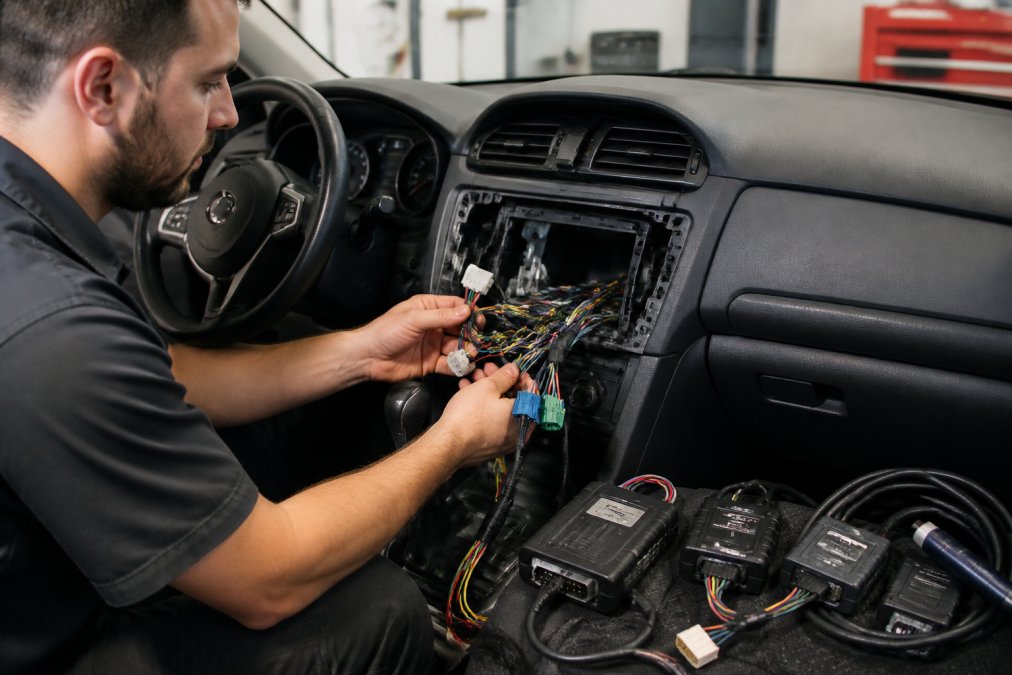
According to IEEE Spectrum analysis on automotive software integration, many OEMs are finding that integrating sophisticated camera software with other vehicle safety systems is proving difficult. The problem compounds when older vehicles receive updates designed for newer hardware. Legacy systems lack the processing power to handle modern software demands, creating bottlenecks that manifest as slow boot times, frozen displays, or radio failures.
This architectural constraint explains why simple radio replacements require programmed hardware interface adapters. The factory radio is a gateway between the CAN bus and the driver's interface, and removing it without proper adaptation can disable vehicle functions entirely.
VIN Locking, Proprietary Interfaces, and Hardware Constraints
Vehicle Identification Number (VIN) locking represents one of the most significant barriers to radio software flexibility. Manufacturers encrypt radio firmware to the specific VIN, ensuring that a radio from one vehicle cannot be programmed for another. This security measure prevents theft and warranty fraud, but it also means that even identical radio models cannot share firmware or settings across vehicles.
Proprietary interfaces compound this problem. Automotive radios use manufacturer-specific wiring harnesses, software protocols, and hardware abstraction layers that vary across decades, forcing OEM radio software to account for incompatible hardware designs.
Factory amplifiers, antenna modules, and steering wheel control interfaces are hardwired to expect specific software commands. Modernizing the radio interface requires maintaining backward compatibility with legacy hardware that predates modern features by years.
Troubleshooting OEM Infotainment Systems: Why Updates Fail
OEM radio software updates fail because firmware must validate against thousands of hardware configurations with unique CAN bus topologies and peripheral integrations. Unexpected combinations can corrupt the radio beyond factory reset recovery.
Common Software Failure Modes
Interrupted updates represent the most frequent failure pattern. Vehicle radios lack robust recovery mechanisms; power loss during a firmware flash can corrupt the bootloader, making recovery impossible without specialized dealer equipment.
Version incompatibility failures occur when an OEM pushes an update designed for newer hardware to vehicles with legacy components. The update installs but fails to initialize because it expects hardware features that don't exist, resulting in black screens or cryptic error codes.
CAN bus communication failures occur when a firmware update introduces timing bugs in radio-to-module communication. The radio functions but sends CAN messages at incorrect intervals, causing unrelated trouble codes that mask the actual problem.
Diagnostic Troubleshooting Framework for End-Users
Determining whether a radio issue is software-based or hardware-based requires systematic testing:
Step 1: Check for Trouble Codes. Use an OBD-II scanner to read diagnostic trouble codes. Software-related radio failures often generate secondary codes in the body control module, CAN bus gateway, or instrument cluster. Codes like "CAN Bus Off" or "Lost Communication with Radio Module" indicate software issues rather than hardware failure.
Step 2: Test Isolated Functions. Try steering wheel controls to change volume or skip tracks. If steering wheel inputs work but the touchscreen doesn't, the issue is isolated to display driver software. If neither works, suspect a CAN bus communication failure.
Step 3: Perform a Controlled Power Cycle. Disconnect the vehicle's battery for 15 minutes to clear volatile memory, then reconnect. If the radio recovers fully, the issue was a software state corruption that a hard reset resolved. If the radio remains non-functional, the firmware itself is likely corrupted and requires dealer intervention.
Step 4: Check Update History. Review the vehicle's service records or infotainment system settings menu for recent software updates. If a failure occurred immediately after an update, the update is almost certainly the cause. Document the exact firmware version before visiting a dealer, this information helps technicians determine whether a rollback is possible.
Why Testing Failures Compound the Problem
OEMs must validate updates across millions of possible hardware combinations without physical access to every configuration, relying on simulation and statistical sampling. This inevitably misses edge cases, a firmware update might pass testing on 99.9% of vehicles but fail on specific combinations, affecting thousands of owners simultaneously once deployed.
FMCSA and NHTSA do not mandate specific testing protocols for infotainment software updates, unlike safety-critical systems, allowing OEMs to deploy updates with less comprehensive testing.
If your radio fails after an update, dealer reset procedures may restore functionality by reflashing the firmware. If the bootloader is corrupted, the radio must be replaced entirely, costing $800 to $2,000 in parts and labor. Some OEMs offer over-the-air rollback for recent vehicles, but older models may have no recovery path other than hardware replacement.
Radio Programming Software: Why Aftermarket Tools Exist
OEM radio software development faces a fundamental problem: manufacturers must support decades of legacy hardware while adding modern features, creating technical debt that makes software increasingly difficult to maintain.
The Hardware-Software Decoupling Problem
Modern vehicle radios run sophisticated software on hardware designed 10 to 15 years ago. A 2024 infotainment system may use a processor with 512 MB of RAM and a 1 GHz dual-core CPU, yet must run Bluetooth 5.0, touchscreen interfaces, cloud synchronization, and real-time CAN bus communication simultaneously.
OEMs cannot simply upgrade hardware because it requires redesigning power management, thermal management, and electrical integration. A mid-cycle infotainment refresh can cost millions in engineering and validation.
Instead, OEMs optimize software to run on constrained hardware. This means stripping features, reducing responsiveness, limiting background processes, and accepting performance compromises. A factory radio might take 30 seconds to boot because the software must initialize dozens of CAN bus connections, validate security certificates, and load configuration data from encrypted storage, all on hardware that would struggle with these tasks in a consumer device.
Firmware Complexity and Memory Constraints
OEM radio firmware is monolithic and tightly coupled to specific vehicle platforms, compiled as a single binary that must fit within 2 to 4 GB of flash memory. This constraint forces trade-offs: every feature adds code size, so OEMs cannot include optional features. Adding new capabilities means removing something else or exceeding available memory.
OEMs typically choose incremental patching over complete rewrites, leading to firmware that accumulates workarounds and legacy code paths that become increasingly difficult to maintain.
Why OEM Programming Tools Are Restricted
Manufacturers restrict programming capabilities to authorized dealers for three primary reasons: security, liability, and business model protection.
Security: Radio firmware controls CAN bus access.
The Complexity of Radio Programming Protocols
Why Aftermarket Tools Emerged
Aftermarket Radio vs OEM: Why Replacement Isn't Simple
Replacing an OEM radio with an aftermarket head unit encounters immediate technical obstacles. Factory radios manage steering wheel inputs, backup camera feeds, and climate control integration that aftermarket units cannot replicate without custom adapters. OEM radios use manufacturer-specific connectors requiring adapter harnesses that may not preserve all functionality. Professional installation often exceeds the radio's cost, making replacement impractical for most users.
Cybersecurity and Over-the-Air Update Risks
Over-the-air (OTA) updates represent a critical vulnerability in OEM radio software architecture. A compromised firmware update could provide unauthorized CAN bus access, enabling attackers to control safety-critical systems. OEM radio software must validate updates while maintaining backward compatibility with older hardware that lacks modern encryption capabilities, preventing security patches for legacy vehicles.
Conclusion: Navigating OEM Radio Software Challenges
OEM radio software difficulty stems from architectural complexity, integration constraints, and business decisions made years before modern connectivity standards emerged. The CAN bus integration, VIN locking, proprietary interfaces, and cascading firmware dependencies create a system that's nearly impossible to update safely or modify easily.
Frequently Asked Questions
What does OEM radio software mean, and why is it so restricted?
OEM radio software refers to the factory-installed operating system and firmware that controls your vehicle's radio and infotainment functions. It's restricted because manufacturers tie it to your vehicle's VIN (Vehicle Identification Number) to prevent theft, ensure compatibility with safety systems, and protect proprietary technology. This locking mechanism makes it nearly impossible for users to modify, update independently, or replace without specialized equipment and dealer intervention.
Why do factory radio settings reset or glitch after software updates?
According to the JD Power 2026 U.S. Vehicle Dependability Study, infotainment systems remain a primary source of vehicle problems. Settings reset or glitch after OEM updates because manufacturers struggle to validate firmware changes across the complex web of integrated systems, climate control, steering wheel controls, driver assist displays, and CAN bus communication protocols. Testing is often incomplete, and legacy hardware conflicts with new code, causing system instability and data loss.
Can I use radio programming software instead of OEM tools to manage my radio channels?
Radio programming software designed by third-party developers can simplify channel management for compatible radio models, though it depends on your specific device. These tools often provide easier interfaces than OEM software and avoid some integration issues. However, they typically work with amateur and commercial radios rather than vehicle factory radios, which remain locked to OEM systems. For vehicle infotainment, your options are limited to dealer updates or professional diagnostics.
Why is it so difficult to replace a factory radio with an aftermarket head unit?
Modern vehicles integrate factory radios deeply with safety systems, climate control, and steering wheel controls through the CAN bus. Aftermarket head unit installation requires programmed hardware interface adapters to retain these vehicle-specific inputs. The proprietary wiring harness and factory amplifier connections are custom to each model, and removing the OEM radio can disable critical functions. This complexity makes simple swaps nearly impossible without professional installation and custom integration work.